If you’re trying to climb the ranks in Valorant, your gear matters more than you’d think. A slow monitor blurs your crosshair. A heavy mouse wrecks your wrist. A sketchy mousepad throws off your muscle memory. I’ve spent enough time grinding ranked to know what actually changes gameplay. Here’s what I recommend for each peripheral category.
Best Valorant Monitor
BenQ Zowie XL2586X+
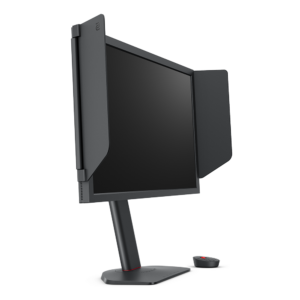
This monitor runs at 600 Hz with a 24.1-inch Fast TN panel, which gives you the fastest response time possible at 1 ms gray-to-gray. The 600 Hz refresh rate means you see enemy movement smoother than any 360 Hz screen can. DyAc 2 technology reduces motion blur, making targets easier to track during quick flicks. The XL-Flex stand lets you fine-tune height and tilt, which matters more than you’d think when you’re sitting at your desk for hours. It comes with a shielding hood that blocks overhead lights and reduces glare. The Auto Game Mode lets you create profiles and flip between them instantly. I’ve seen plenty of streamers and pros use this monitor and they’re not wrong. It does not look as pretty as an IPS panel, but Valorant does not need pretty. It needs fast. Get it here: https://amzn.to/42lILi5
ASUS ROG Swift Pro PG248QP
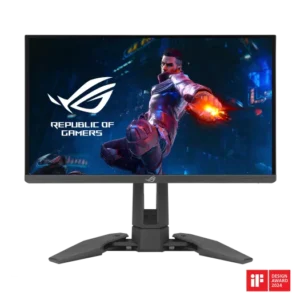
This monitor hits 540 Hz on a 24-inch E-TN panel, which makes it one of the fastest gaming monitors available. The Esports TN tech delivers sub-1 ms response time with NVIDIA G-SYNC native support and FreeSync for tear-free play. At 1080p the pixel density is not perfect but competitive Valorant players prioritize refresh rate over resolution anyway. The 540 Hz refresh rate gives you smoother motion clarity than any 360 Hz panel. The stand adjusts height, tilt, and swivel. It costs more than the Zowie but the higher refresh rate and G-SYNC support make it a solid alternative for players who want NVIDIA’s variable refresh rate. Why it matters: if you want a monitor that tracks the Zowie in raw speed but adds G-SYNC, this is the one. Get it here: https://amzn.to/4coLyvy
Best Valorant Mouse
Logitech G PRO X Superlight 2
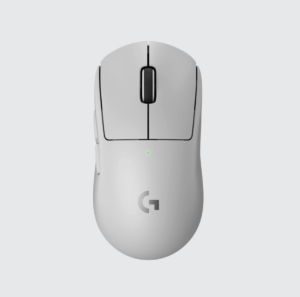
The Superlight 2 is one of the most popular mice among pro players and for good reason. At 60 grams it is light enough for fast flicks without the flex you get from cheaper ultralight mice. The HERO 2 sensor tracks flawlessly with zero acceleration and the LIGHTSPEED wireless connection delivers reliable, low-latency performance. The symmetrical shape works for both palm and claw grips. The optical switches eliminate double-clicking issues that plague mechanical switch mice over time. The battery lasts about 95 hours, which is enough for a full week of grinding. It costs $159 and you can find it on Amazon with the affiliate link below. Why it matters: a proven shape, a proven sensor, and enough battery life that you stop worrying about charging. Get it here: https://amzn.to/4tiHSTj
Logitech G PRO X2 SUPERSTRIKE LIGHTSPEED
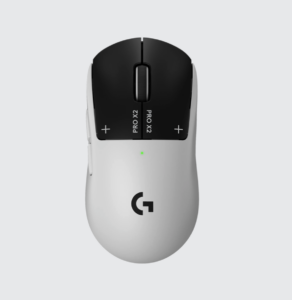
The Superstrike is Logitech’s newest take on competitive mice. At 65 grams it sits in the lightweight category and the HERO 2 sensor delivers flawless tracking with zero acceleration. The standout feature is the Haptic Inductive Trigger System, which lets you set the actuation point and uses haptic motors to simulate tactile feedback instead of a physical click. You can adjust the sensitivity on the fly with G Hub. The LIGHTSPEED wireless connection supports up to 8000 Hz polling rate, which feels instantaneous in-game. The battery lasts about 95 hours, which is enough for a full week of grinding. The shape matches the Pro X Superlight 2, so anyone coming from that mouse will know how it feels. It costs $180, which puts it in premium territory but the analog switching technology is unlike anything else on the market. Why it matters: if you want cutting-edge tech with adjustable actuation points, this mouse delivers. Get it here: https://amzn.to/48PrnG7
Best Valorant Mousepad
Pegasi Genesis
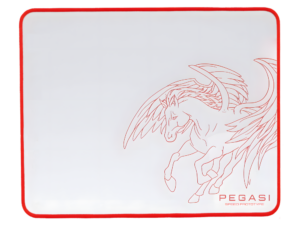
Pegasi is a new brand and it’s awesome. The Genesis uses premium Japanese PORON foam under a high-tension microfiber-grade polyester surface. Its surface has a smooth glide and precise stopping power, which is exactly what you want for flicking your way to an ace. It feels faster than a control pad but more stable than a speed pad. The stitched edge holds up over heavy use. We prefer the black color since it blends into most setups without drawing attention away from your screen. Black & white are both great though. We’ve had a few months of gaming time with both the black & white versions and the consistency is impressive. You don’t lose speed after weeks of play, which cheap pads can do. Still, it’s a great mouse pad at a great price. Why it matters: a surface that stays consistent is the difference between your muscle memory working for you and against you. Get it here: https://pegasigear.com/products/genesis
Artisan Hien Mid XL
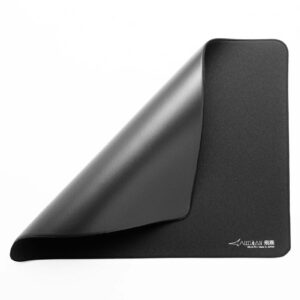
This is the pad that shows up a lot on pro setups. The micro-woven surface gives a smooth, fast glide that rewards precision flicks. It measures 960 x 450 mm, which gives you room for high-sensitivity tracking. The stitched edge holds up over months of heavy use. It costs around $59 but it is worth every dollar if you care about consistency. The surface does not change speed over time like cheaper pads. Why it matters: a consistent glide surface means your muscle memory stays reliable across sessions. Grab it here: https://amzn.to/3QdI8oh
Best Valorant Keyboard
Wooting 60HE v2
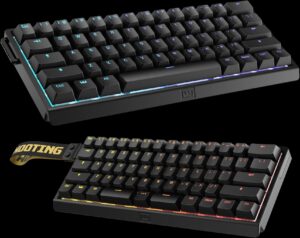
This is the keyboard that changed how people think about gaming input. It uses Hall Effect magnetic switches that track exactly how far each key is pressed instead of a binary on-off. The Rapid Trigger feature lets you reset a key the moment you lift your finger past the actuation point, which gives you faster movement in-game. You can adjust the actuation point per key or across the board with Woottility software. The 60% layout saves desk space and the aluminum shell gives it a solid, premium feel. The Lekker Tikken switches come pre-lubed from the factory and feel smooth right out of the box. The 8000 Hz polling rate means virtually zero input lag. The Rappy Snappy mod lets you remap your arrow keys to act as a numpad when held. It’s not cheap, but the competitive advantage is real. Why it matters: Rapid Trigger gives you a measurable edge in movement-heavy games like Valorant where every millisecond counts. Get it here: https://wooting.io/wooting-60he-v2
Wooting 80HE
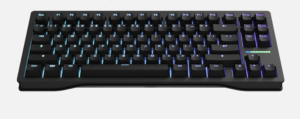
The 80HE takes everything great about the 60HE and adds back the number pad and arrow keys in an 80-percent layout. Same Hall Effect sensors, same Rapid Trigger, same 8000 Hz polling. The full layout means you can use your number keys for binds and ability macros without reaching for function layers. The analog switching means you can set the actuation point for movement keys differently than your shooting keys. The build quality matches the 60HE with pre-lubed switches and a sturdy frame. It works with Woottility for per-key customization and works alongside Valorant’s settings. Why it matters: if you want the Rapid Trigger advantage but need a full layout for binds, this is the one. Get it here: https://wooting.io/wooting-80he
The Short Version
The Zowie XL2586X+ monitor, Logitech PRO X Superlight 2 mouse, Pegasi Genesis Black mousepad, and Wooting 60HE v2 keyboard form a solid competitive stack. Swap the monitor for the ROG Swift Pro PG248QP if you want G-SYNC. Pick the Superlight 2 if you want a proven shape or the Superstrike if you want cutting-edge haptic switches. Pick the Wooting 80HE if you need a full layout with Rapid Trigger. Your rank goes up when your gear stops being the bottleneck. Game on!
This post contains affiliate links, meaning we get a commission if you make a purchase through our links, at no cost to you.