Gaming monitors have gone wild. We’re seeing 600 Hz panels, 540 Hz OLEDs, and sub-1ms response times that would have looked like sci-fi five years ago. Picking the right one depends on what you play and your GPU chops. A 600 Hz monitor is useless if your graphics card can’t push 600 fps. We broke down the best options for every use case and budget so you can make a solid pick.
Best Overall — ASUS ROG Swift OLED PG27AQWP-W
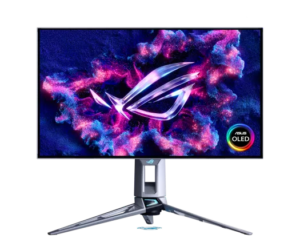
This monitor hits 540 Hz on a 27-inch WOLED panel with a 1440p resolution. It uses a dual-cell Tandem OLED panel that delivers higher brightness and better color than older WOLED panels. Response time sits at 0.02ms, which is crazy and means virtually zero ghosting or blur. The monitor also supports a 720p Frame Rate Boost mode that pushes the refresh rate to 720 Hz when you crank games to ultra-low resolution for maximum frame rates. G-SYNC native support and FreeSync Premium Pro cover variable refresh rate without tearing. Reddit reviewers on r/MonitorDrome note that the color accuracy out of the box is excellent, and Tom’s Hardware’s review calls it the best OLED gaming monitor available. Get it here: https://amzn.to/4tzlNA0
Best 4K 240Hz — ASUS ROG Swift OLED PG27UCDM
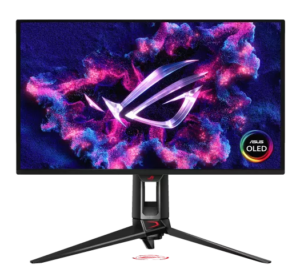
This is one of the first monitors to combine 4K resolution with a 240 Hz refresh rate on a QD-OLED panel. At 27 inches, the pixel density is sharp enough for AAA games while the 240 Hz refresh rate handles competitive shooters without complaint. The 4th-generation QD-OLED panel delivers 0.03ms response time and 1,000 nits peak brightness with HDR10 support. G-SYNC and Adaptive-Sync cover variable refresh rate. RTINGS calls it one of the best high-end gaming monitors available, and Tom’s Hardware’s review notes it excels in both competitive and immersive gaming. The catch is the price — this is a premium monitor that demands a premium GPU. Get it here: https://amzn.to/4coPkqh
Best 500Hz IPS — Alienware AW2524HF
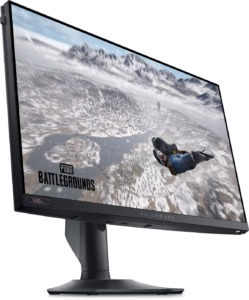
The AW2524HF is Alienware’s updated take on the AW2524H. It keeps the same 24.5-inch Fast IPS panel with a 500 Hz refresh rate, but at a lower price point by trimming some of the extra features that drove the cost up. MonitorNerds describe it as a purpose-built competitive panel. It’s about gaming, not gorgeous HDR images or cinematic color. It’s about the cleanest motion and lowest latency you can get from a mainstream 1080p display. DisplayNinja notes that colors are accurate out of the box with good Delta E calibration and full sRGB coverage. The IPS panel delivers wide 178° viewing angles. They claim sub-1ms input lag. If you run Valorant, CS2, or Overwatch at ultra-low settings for maximum frames, this monitor will feel smoother than a 240 or 360 Hz panel. Just note that you need to use DisplayPort to get the full 500 Hz. Reviewers on Reddit note that if you aren’t already optimizing your entire setup for competitive play, you probably don’t need 500 Hz. But if you’re that player, the AW2524HF is one of the most accessible ways to get there without dropping premium esports money. Why it matters: if you want the fastest IPS panel available at a more reasonable price than the full-feature version, this monitor delivers. Get it here: https://amzn.to/4cRAdpn
Best Budget 1080p — KTC H25X7 24.5″
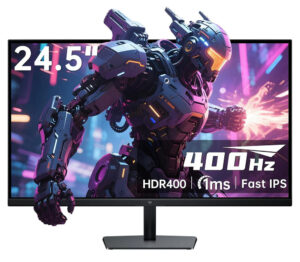
The KTC H25X7 is a 24.5-inch Fast IPS monitor that hits 400 Hz via DisplayPort and 240 Hz via HDMI. At 1080p resolution, it is optimized for competitive FPS titles where frame rate matters more than pixel density. The 99% sRGB coverage and 128% sRGB volume deliver decent color for a budget panel. The 1ms response time eliminates ghosting in fast shooters. It comes with both HDMI 2.0 and DisplayPort 1.4 inputs, height-adjustable stand, and a silver-gray finish that looks clean on any desk. Reviewers note it punches well above its price point, delivering performance that rivals monitors twice the cost. It does not have G-SYNC native support, but FreeSync works well with most AMD and NVIDIA GPUs. Why it matters: 400 Hz at a budget price point is hard to beat for competitive players who want maximum motion clarity without spending premium money. Available here: https://amzn.to/3OuLnao
The Short Version
The ASUS ROG Swift OLED PG27AQWP-W is the best overall monitor if budget isn’t a factor. The ASUS ROG Swift OLED PG27UCDM is the pick for 4K gaming at 240 Hz. The Alienware AW2524H is a crazy fast IPS panel available. The KTC H25X7 gives the best budget performance at 400 Hz. Your GPU matters as much as your monitor, so make sure your graphics card can actually push the frame rates your monitor supports. Game on!
This post contains affiliate links, meaning we get a commission if you make a purchase through our links, at no cost to you.